

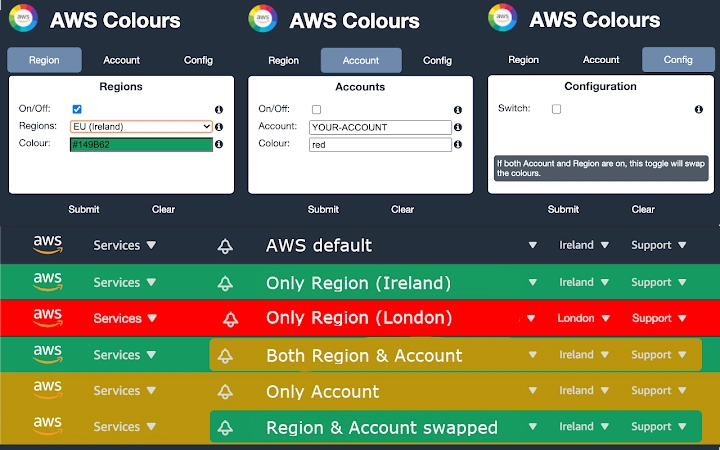
Description
Color-Coded AWS Console for Better Region Awareness
Overview
The Color-Coded AWS Console extension is designed to improve visibility and reduce errors in AWS management by dynamically changing the console header color based on the selected Region and Account. This visual cue helps users quickly identify their current environment, minimizing the risk of deploying resources to unintended locations. The tool is particularly useful in multi-account and multi-region AWS setups where configuration mistakes can lead to significant operational or financial consequences.
Target users include cloud engineers, DevOps professionals, and AWS administrators who manage complex environments across multiple regions and accounts. The extension operates directly within the browser, requiring no installation beyond standard browser extension procedures. It does not modify AWS infrastructure or interact with backend services—its sole function is visual differentiation.
Real-world usage scenarios include teams managing production, staging, and development environments across different regions, where a simple visual change can prevent costly misconfigurations. The developer did not provide additional background information. The extension is lightweight and operates in the foreground of the AWS console, ensuring minimal disruption to workflow.
Key Features & Capabilities
- Dynamic Header Coloring – Automatically updates the AWS console header color based on the currently selected Region and/or Account.
- Customizable Color Assignment – Users can assign any CSS-compliant color to specific Regions and Accounts, overriding default settings.
- Visual Error Prevention – Provides immediate visual feedback to reduce the risk of deploying resources in the wrong environment.
- Simple Configuration Interface – Allows users to define and manage color mappings through an intuitive in-browser settings panel.
- Non-Intrusive Operation – Runs in the background without altering AWS behavior or requiring elevated permissions.
For example, a cloud engineer managing a global infrastructure might assign red to the "us-east-1" production account and green to the "eu-west-1" staging environment. This immediate visual distinction helps prevent accidental deployments during high-pressure scenarios. The extension does not store user credentials or sensitive data, and all configurations are managed locally within the browser.
User Interface, Workflow & Performance
The extension integrates directly into the AWS console interface, modifying only the header bar’s background color. The UI is minimal and focused, with a settings panel accessible through the browser’s extension menu. Navigation is straightforward: users open the extension settings, select a Region or Account, and choose a color from a standard color picker or input a hex code.
Workflow efficiency is enhanced by the immediate visual feedback provided upon changing regions or accounts. The color update occurs in real time, requiring no page reload or additional action. The developer did not specify resource usage details. Performance observations are based on general software behavior patterns. The extension is designed to be lightweight, with a 1.2 MB file size, suggesting minimal impact on browser performance.
Stability appears to be consistent with standard browser extension behavior. No crashes or conflicts were reported in the provided information. The extension operates independently of the underlying AWS API, relying solely on client-side rendering and DOM manipulation.
Compatibility & System Requirements
The extension is compatible with Windows, Mac, and Linux operating systems, supporting modern web browsers that allow extension installation. It is available as a standalone browser add-on and does not require additional software or system-level privileges.
Exact system requirements were not listed. The installation size is 1.2 MB, which is typical for lightweight browser extensions. Hardware requirements are not specified, but the extension is expected to function on standard desktop systems with sufficient browser memory and processing power. Compatibility with specific AWS console versions is not detailed, but it is designed to work with the current AWS web interface.
Pros and Cons
Pros
- Reduces risk of misconfigurations through visual cues
- Easy to configure with intuitive color selection
- Lightweight and fast with minimal resource usage
- Runs entirely in the browser with no backend dependencies
- Free to use with no licensing restrictions
Cons
- No offline functionality since it depends on AWS console access
- Does not provide audit logs or error notifications
- Customizations are stored locally and may be lost if browser data is cleared
- Only works within the browser; not available as a standalone desktop application
- Limited to AWS console environment; not applicable to CLI or other tools
FAQ Section
Is the extension compatible with all AWS console versions?
The extension is designed to work with the current AWS web console interface. Compatibility with future updates is not guaranteed and depends on changes to the console’s DOM structure.
Does the extension store my AWS credentials or account data?
No. The extension does not collect, store, or transmit any AWS credentials, account information, or sensitive data. All configurations are managed locally within the browser.
Can I use this tool offline?
No. The extension requires an active connection to the AWS console to detect region and account changes. It cannot function without access to the AWS web interface.
How do I update the extension?
Updates are managed automatically through the browser’s extension store. Users will receive notifications when a new version is available.
Is this tool secure to use?
Yes. The extension operates within the browser’s security sandbox and does not require elevated permissions. It only modifies the visual appearance of the AWS console header and does not interact with AWS APIs or backend services.
Final Thoughts + CTA
The Color-Coded AWS Console extension offers a simple yet effective solution for reducing human error in cloud infrastructure management. Its visual feedback mechanism is particularly valuable in high-stakes environments where region and account misselection can lead to costly consequences. While it does not replace comprehensive monitoring or governance tools, it serves as a valuable layer of defense through proactive visual awareness.
Cloud professionals managing multi-region, multi-account AWS environments will benefit most from this tool. Its lightweight design, ease of use, and zero cost make it an accessible addition to any AWS workflow. The extension’s focus on prevention through design is a strong advantage in today’s complex cloud ecosystems.
Download Color-Coded AWS Console tool now to enhance your AWS management experience and reduce the risk of misconfigurations.
Guides & Tutorials for AWS Colours Extension for Chrome
How to install AWS Colours Extension for Chrome
- Click the Preview / Download button above.
- Once redirected, accept the terms and click Install.
- Wait for the AWS Colours Extension for Chrome download to finish on your device.
How to use AWS Colours Extension for Chrome
This software is primarily used for its core features described above. Open the app after installation to explore its capabilities.
User Reviews for AWS Colours Extension for Chrome 0
No reviews found





